Decision models · · 7 min read
Jev can see now: typed decisions over images
Jev, TypeSafe's decision model, has always worked on text: you send app state and a set of typed questions, and you get typed answers with calibrated probabilities instead of prose. With Jev 1.14, released on October 14, 2026, the state can include images — and a new question type, box, answers where something is in one.
That turns a whole class of “look at this picture and decide” work into a single, cheap, structured call. Below: how it works, a real request with its real answers, the use cases worth trying, and the caveats TypeSafe itself puts on the feature.
What changed in 1.14
- Images in state. PNG or JPEG stills, 256 to 1,568 pixels per side, up to 16 MiB each and 32 MiB per request. An image is just another value in
state, so it sits next to the text it should be judged against — a listing title, a ticket body, a form type. - Box questions. A fourth question type beside noul (yes/no), choice and score. It takes a description of the target and returns one rectangle —
top,bottom,left,rightas fractions of the image — plus a confidence. Box is new in 1.14. - Same price. Images bill as ordinary input tokens and answers stay free. In our measurements a 512×512 JPEG costs about 800 tokens and a full 1,568×1,568 one about 6,300.
A real check: does the photo match the listing?
Here is a marketplace listing check, run through OttoPort against jev-1.14. One product photo, a listing title, and five questions asked at once — including a box question to find the product so a thumbnail can be cropped around it.
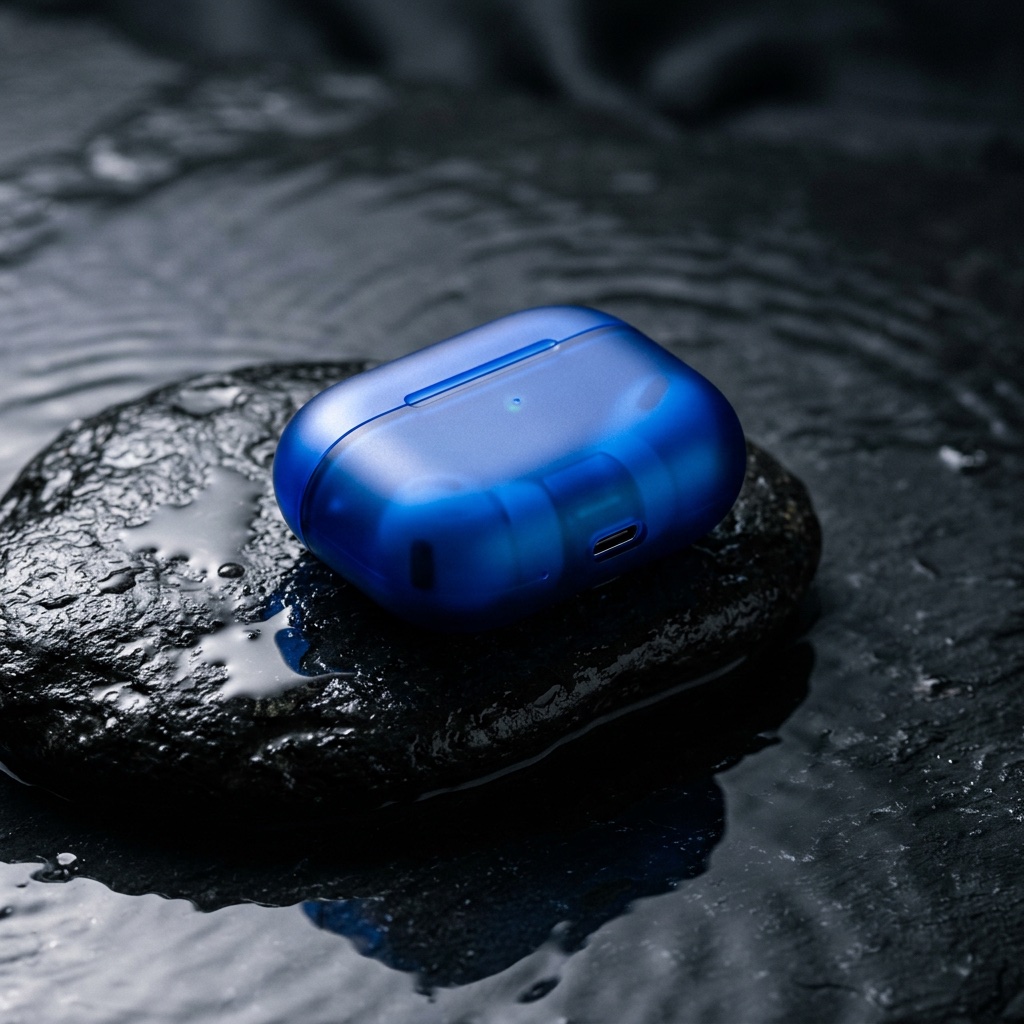
We sent it twice: once with the title the photo was shot for — “Wireless earbuds charging case — cobalt blue” — and once with a title that does not belong to it — “Hydrating face serum — 30 ml, cobalt glass bottle”. The mismatched request, with four of its five questions (the fifth asks whether any label text is legible) and the image shortened — it is a base64 data URL:
curl https://ottoport.ai/api/v1/decisions \
  -H "Authorization: Bearer $OTTOPORT_API_KEY" \
  -H "Content-Type: application/json" \
  -d '{
    "model": "jev-1.14",
    "state": {
      "listing_title": "Hydrating face serum — 30 ml, cobalt glass bottle",
      "listing_category": "Beauty > Skincare",
      "photo": { "type": "image_url", "image_url": { "url": "data:image/jpeg;base64,/9j/4AAQ…" } }
    },
    "questions": {
      "photo_matches_title": {
        "type": "noul",
        "instructions": "Does the photo show the product named in the listing title?",
        "criteria": { "true": "The photo shows that product", "false": "The photo shows something else" }
      },
      "photo_quality": {
        "type": "choice",
        "instructions": "Is the photo good enough to publish as the listing's main image?",
        "criteria": { "publish": "Sharp, well lit, product clearly visible", "retake": "Blurry, dark, cluttered or cropped" }
      },
      "listing_readiness": {
        "type": "score",
        "instructions": "How ready is this photo to be the main image of a marketplace listing?",
        "criteria": [
          "Unusable: wrong product or unreadable", "Weak: product hard to see",
          "Acceptable: product visible but plain", "Good: clear and well lit",
          "Excellent: polished studio-grade shot"
        ]
      },
      "product": { "type": "box", "instructions": "the serum bottle in the listing photo" }
    }
}'| Question | Type | “Face serum” title | “Earbuds case” title |
|---|---|---|---|
| photo_matches_title | noul | 0.02 | 0.93 |
| photo_quality | choice | retake · 0.98 | publish · 0.64 |
| listing_readiness | score (0–4) | 0.17 — 0.96 on “Unusable” | 3.05 — split between “Good” and “Excellent” |
| text_on_product | noul | 0.07 | 0.07 |
| product | box | boxed the case anyway · confidence 0.50 | same box · confidence 0.90 |
Three things stand out.
- It caught the wrong listing. Same pixels, different title, and the match probability went from 0.93 to 0.02. Every other answer followed: with the serum title, the photo became a “retake” and scored “Unusable” — because for that listing, it is.
- The uncertainty is honest. With the right title, “publish” came back at only 0.64. The photo is moody and dark — a reasonable call either way — and Jev says so instead of rounding to yes. That 0.64 is the number you set a threshold against.
- The box is useful on its own. Asked for “the earbud charging case”, it drew a tight box at 0.90 confidence. Asked for “the serum bottle” — which is not in the photo — it boxed the case anyway, at 0.50. More on that below.
Each request was 3,343 input tokens — the image plus all five questions. At OttoPort's rate for Jev 1.14 ($0.047 per 1M input tokens, output free), that is about $0.000157 per check, or roughly 6,364 checks for a dollar. Round trips took 1.8 to 3.8 seconds.
Why a decision model, not a vision chatbot
You could ask any vision LLM “does this photo match the title?” and parse the reply. What Jev changes is the shape of the answer:
- Typed, every time. A noul is a probability, a choice is one of your keys, a box is four numbers. Nothing to parse, no “As an AI…”, no answer outside the options you gave.
- Calibrated. TypeSafe trains Jev for calibration, not for agreeable prose — so a 0.64 and a 0.98 are meant to be different, and thresholds tuned on your data carry meaning.
- Many questions, one call. The five questions above were one request, answered in parallel, priced on input only.
Use cases worth trying
Marketplace and catalog QA
Does the main photo show the product in the title, is it publishable, where is the product so the thumbnail can be cropped around it. The check above is this use case, and it is the one TypeSafe's own docs lead with.
noul: matches title · choice: publish / retake · box: the product
Document intake
Route scanned forms before anyone opens them: is there a signature, is it stamped, which of your form types is it, is the page upside down. Each is a question with a probability, so an unsure scan goes to a person instead of the wrong queue.
noul: signed · choice: form type · box: the signature
Doorbell and delivery events
From a single camera still: is someone at the door, are they carrying a package, is it left on the step. Cheap enough to ask on every motion event, and the box tells you where to crop the notification thumbnail.
noul: person present · noul: package left · box: the package
Support screenshots
A ticket arrives with a screenshot. Which product area is it, is an error dialog on screen, is it the mobile or desktop app. The answers route the ticket; the text of the ticket rides along in state for context.
choice: product area · noul: error visible · choice: platform
Moderation pre-screening
Score uploads against your own policy and send only the uncertain middle to human review. Calibrated probabilities are the point here: a threshold you can tune on your traffic, not a yes/no that hides how sure the model was.
score: policy risk · choice: queue
Gating generated images
Before an image from a generation model ships — ours included — check it the way an art director would: is the product actually in it, is the brand colour right, is there garbled text. A failed check regenerates; it costs a small fraction of the image it is judging.
noul: product present · noul: text legible · score: on-brand
Where it is not ready yet
TypeSafe ships image input and box questions as “danger zone” features: on by request, with a format and limits that may change between releases, and — in its own framing — not yet something it vouches for in production. Build with that in mind:
- Box always answers. There is no “not found”: ask for something that is not in the picture and you still get four edges. Pair every box with a noul about the same target and ignore the box when the noul is low. Above, a box asked for a serum bottle that is not there came back drawn around the earbud case; only the 0.02 match probability beside it said otherwise.
- Images are slower. Text-only decisions are sub-second; image requests run in TypeSafe's long-context mode, and ours took two to four seconds. Fine for a queue, wrong for a keystroke.
- Image accuracy trails text. TypeSafe says as much. Measure on a labelled sample of your own images before automating anything that matters, and keep a human on the uncertain middle.
- Stills only, sent inline. PNG or JPEG as a base64 data URL; remote URLs are not fetched, and video frames have to be extracted first.
Try it
The Jev 1.14 playground opens on a listing check like this one — add your own image, put its {{image_1}} placeholder anywhere in state, and the boxes are drawn on the picture for you. From code it is one request to POST /api/v1/decisions with an OttoPort key: the same key that reaches every other model in the catalog, billed per token with no subscription.